AI-DNO

Diagnostic Network Optimization for accessible, equitable testing

Most diagnostic networks reach only a fraction of clinics. AI-DNO models where facilities, devices, and sample routes should go—so accurate diagnostics reach more people, faster and at lower cost.

About AI-DNO

What is Diagnostic Network Optimization?

DNO is a geospatial analytics approach used to:

  1. 01

    Analyze the current diagnostic network

  2. 02

    Recommend the optimal type, number, and location of diagnostics and the sample referral network needed to hit national health goals

  3. 03

    Minimize overall network costs, subject to applied access constraints

In practice, DNO decides where testing facilities and devices should be placed, and how samples and results should move between them — to get accurate diagnostics to more people, faster and at lower cost.

The network challenge

High costs and system inefficiencies are keeping testing out of reach

Most diagnostic networks aren't held back by a lack of effort, they're held back by a lack of data-driven decisions. Facilities, devices, and referral routes get built up over time without the ability to model trade-offs, so networks end up expensive to run and still fail to reach the people who need them most.

CharacteristicWithout AI-DNOWith AI-DNO
Access to testingLow and inequitable — hard-to-reach populations wait longestTesting placed where underserved populations actually live
Collection-to-lab distanceLong sample journeys delay results and raise transport costOptimized routes so samples travel less and return faster
Referral modelPatients travel to testing sitesSamples move; patients stay in their community
Testing capacityClustered at a few central sitesDecentralized toward where demand actually is
Device placementIdle in some sites, queues in othersPlaced by utilization and demand, not history
Trade-off analysisNo cost vs coverage scenarios to compareBaseline vs optimized, side by side, before you commit
AI-DNO impact focus

Networks designed for access & cost.

Compare
Scenarios
Clear
Trade-offs
Equitable
Access
2 modes
Plans

AI-DNO makes placement, routes, and budget trade-offs visible—so you redesign diagnostic networks with evidence, not guesswork.

Legacy networks leave machines idle in one place and queues elsewhere. Scenario modeling puts capacity where demand and equity gaps actually are, before you commit spend.

Network scenarios

Compare baseline vs optimized placements before you move a single device.

Cost & access clarity

See coverage, turnaround, and budget impact together—not in separate sheets.

Route & hub design

Model sample flow so hard-to-reach sites stop waiting the longest.

Product features & benefits

Design networks that balance cost, speed, and access

AI-DNO turns facilities, devices, and routes into scenarios you can compare before redesign.

Fewer idle machines

Put capacity where demand and equity gaps actually are—shorten queues where it matters.

Pro, Ultra & Enterprise

Work solo on Pro or Ultra, or with your org on Enterprise—the same optimization engine, the right collaboration model.

Grounded DNO advice

Ask for recommendations tied to your project network—not generic templates.

How it works

From network data to evidence-led design

AI-DNO makes placement, routes, and budget trade-offs visible before you redesign diagnostic capacity.

01

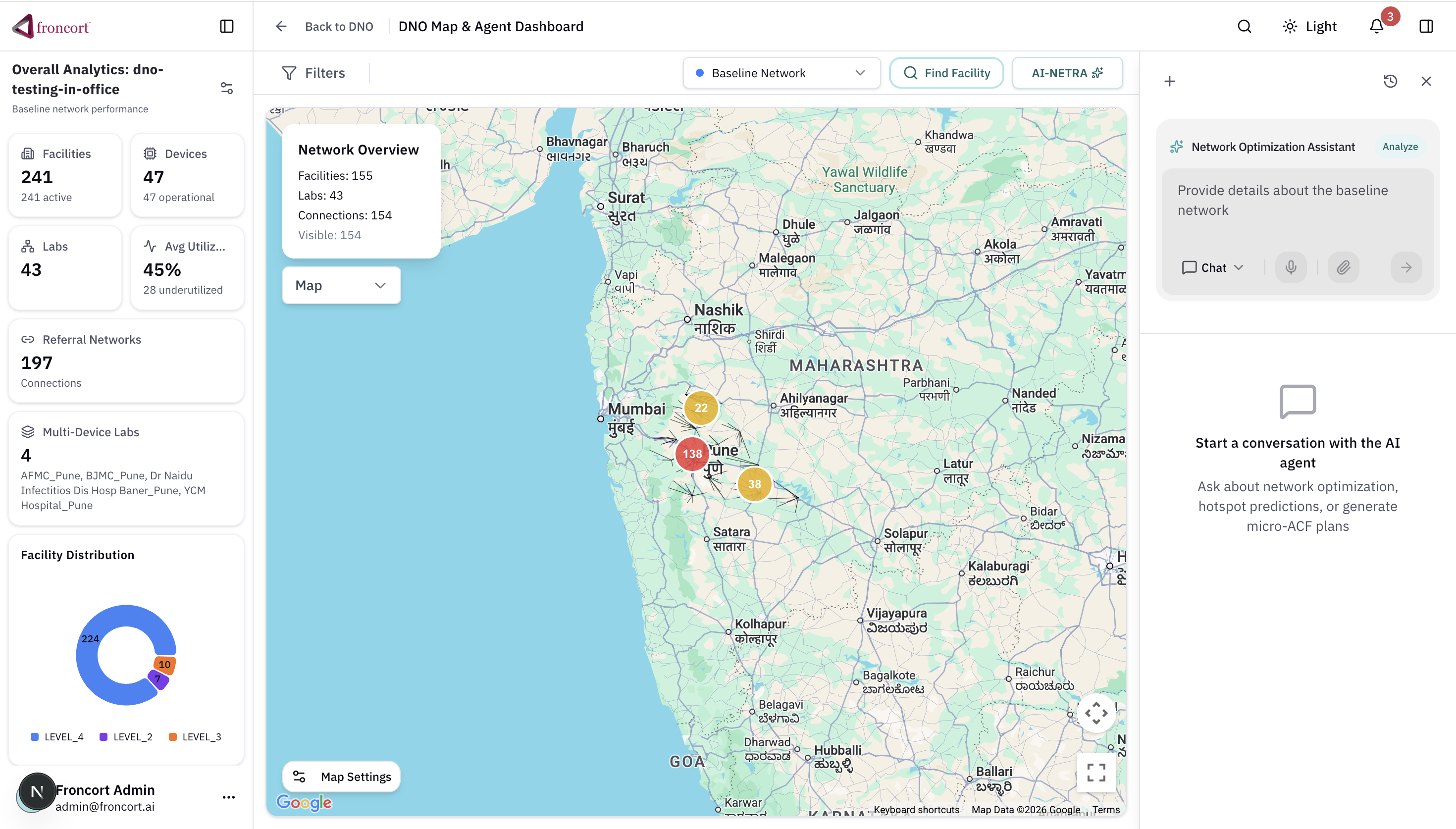
Map the baseline network (“as-is state”)

Capture facilities, devices, transport routes, demand, and existing diagnostic capacity.

02

Run scenarios

Compare baseline vs optimized designs for various future scenarios including cost, turnaround time, and access.

03

Compare trade-offs

Surface impact of decisions like moving idle devices, testing backlogs, and redesign of sample referral and transport systems, increasing capacity by adding new devices.

04

Commit with clarity

Share plans in individual or enterprise workspaces so stakeholders align before changing and spend.

Why AI-DNO

From data to decisions, faster

AI-DNO is built to remove the friction that usually slows diagnostic network planning down — so you spend less time wrangling data and more time making decisions.

Easier data input & handling

Bring in facility, device, demand, and transport data without wrestling with rigid formats or manual cleanup.

Identifies challenges in your baseline

Automatically surfaces gaps, bottlenecks, and inefficiencies in your current network before you start modeling changes.

Built-in costing

See the cost implications of each scenario as you build it, not as an afterthought.

Simple and intuitive

Designed for planners, not just data scientists — no deep technical background required to get meaningful results.

Faster results

Get modeled scenarios and recommendations in a fraction of the time traditional network analysis takes.

Conversational, NLP-powered interface

Chat with the DNO agent to ask questions, explore trade-offs, and get recommendations grounded in your own project data.

Open source vs premium

Start free locally, scale in the cloud

AI-DNO open-source core covers baseline analysis and Open Referral optimization. The AI-NETRA platform adds collaboration, AI assistance, and enterprise controls.

Self-hosted

Open-source AI-DNO

Run the optimization engine on your machine with JSON/CSV inputs — ideal for analysts validating networks before programme rollout.

  • Baseline network metrics — Headline KPIs and validation reports
  • Open Referral MILP — Sample referral redesign optimization
  • JSON + CSV I/O — CLI and local no-code UI (CSV upload in Prepare inputs)
  • No license fee — Apache-style OSS core; solver download on first install
Hosted premium

AI-NETRA platform

Multi-user workspace with agentic assistance, richer ingestion, and billing-backed feature limits with add-on packs.

  • Hosted workspace — Projects, scenarios, and team collaboration
  • AI agent chat & voice — Grounded recommendations on your network data
  • Excel ingestion — Paid ingest jobs for programme workbooks
  • Usage limits + add-ons — Monthly scenario caps with purchasable top-ups
  • Enterprise support — Per-seat metrics, sales-assisted plans
Get started with AI-DNOGet started with AI-DNO
Security & trust

Network planning you can share safely

AI-DNO supports individual and enterprise workspaces so facility and device data stays under your control.

Workspace isolation

Pro, Ultra, and Enterprise plans stay separated so organizational data is not mixed by default.

Controlled collaboration

Share scenarios with the right stakeholders—without exposing raw network details broadly.

Facility data care

Device, route, and demand inputs are treated as operational assets, not public artifacts.

Defensible trade-offs

Scenario comparisons stay transparent so budget and placement decisions can be audited later.

Compare tools

Why teams choose AI DNO

A side-by-side view of common DNO analysis tools — license, skills, timeline, and data history requirements.

CharacteristicAccessModOptiDxBI (Power BI / Tableau)AI DNO
License feeOpen sourceOpen accessLicense requiredSubscription (hosted platform)
Skillset requiredGIS analystSupply chain analystData analystProgramme manager (self-serve UI)
Typical timeline2–3 months3–6 monthsDepends on analysisMinutes to hours per scenario
DNO historyEncouragedRequiredDepends on analysisNot required
Further resourcesUNIGE AccessMod docsOptiDx.org guides & SOPsVendor training & dashboardsIn-app guide + AI agent support

Characteristics for AccessMod, OptiDx, and BI (Power BI / Tableau) align with the Stop TB Partnership DNO Implementation Guide (Annexure C). AI DNO reflects the Froncort platform.

Pricing

Choose the plan that fits how you work

AI-DNO supports solo planners on Pro or Ultra, and Enterprise teams — same optimization engine, the right workspace model.

Pro
Solo planners

Pro

Design and compare diagnostic network scenarios on your own—without organization setup.


  • Personal workspace — Skip org setup and jump straight into projects
  • Network scenarios — 20 optimization runs/month; +10 run add-on packs available
  • Network size — Up to 500 network elements across your projects
  • Route & hub design — Model sample flow for hard-to-reach sites
  • Grounded DNO agent — Recommendations tied to your project network
Most popular
Ultra
Power solo planners

Ultra

Higher usage caps and a larger network footprint for advanced solo diagnostic planning.


  • Personal workspace — Same solo workflow with expanded limits
  • Network scenarios — 60 optimization runs/month with add-on top-ups
  • Larger network size — Up to 2,500 network elements and 15 projects
  • Full DNO engine — Scenarios, routes, and equity trade-offs
  • Grounded DNO agent — More agent chat and voice minutes each month
Enterprise
Teams & orgs

Enterprise

Collaborate across your organization with shared projects, members, and invites.


  • Organization workspace — Shared home for your program or partner team
  • Team invites & members — Bring planners and reviewers into one org
  • Shared projects — Collaborate on network redesigns together
  • Full DNO engine — Scenarios, routes, and equity trade-offs
  • Grounded DNO agent — Advice against your org’s project data
  • Program-ready collaboration — Built for multi-site diagnostic planning

Pro includes 20 scenario optimizations per month. Need more? Purchase add-on packs anytime from your billing dashboard.

Next step

Design networks with evidence, not guesswork

Create your AI-DNO workspace, or reach out to explore enterprise collaboration.

FAQs

Questions about AI-DNO

How scenario modeling helps you redesign diagnostic networks before you move devices.